Run HR for thousands of people without a single spreadsheet.
Payroll, biometric attendance, leave, self-service, and separation — one system of record for the entire employee lifecycle. Punches become records, records become payslips, and month-end stops being a fire drill.
The spreadsheet tax
HR on spreadsheets doesn't scale. It compounds.
Every hire adds rows to attendance sheets, leave trackers, and payroll workbooks that all have to agree with each other — and don't.
Month-end is a fire drill
Chasing timesheets, reconciling punches against leave, recomputing deductions after every correction. Payroll week eats your HR team alive — every single month.
Errors reach paychecks
A missed leave deduction or a stale tax slab in a workbook becomes a wrong paycheck — and wrong paychecks are how good people start reading job boards.
No answer survives an audit
Who approved this leave? Which punches back this overtime? When the trail lives across files and inboxes, every audit and every dispute becomes archaeology.
One Command Center
The whole company, on the screen your Monday starts with
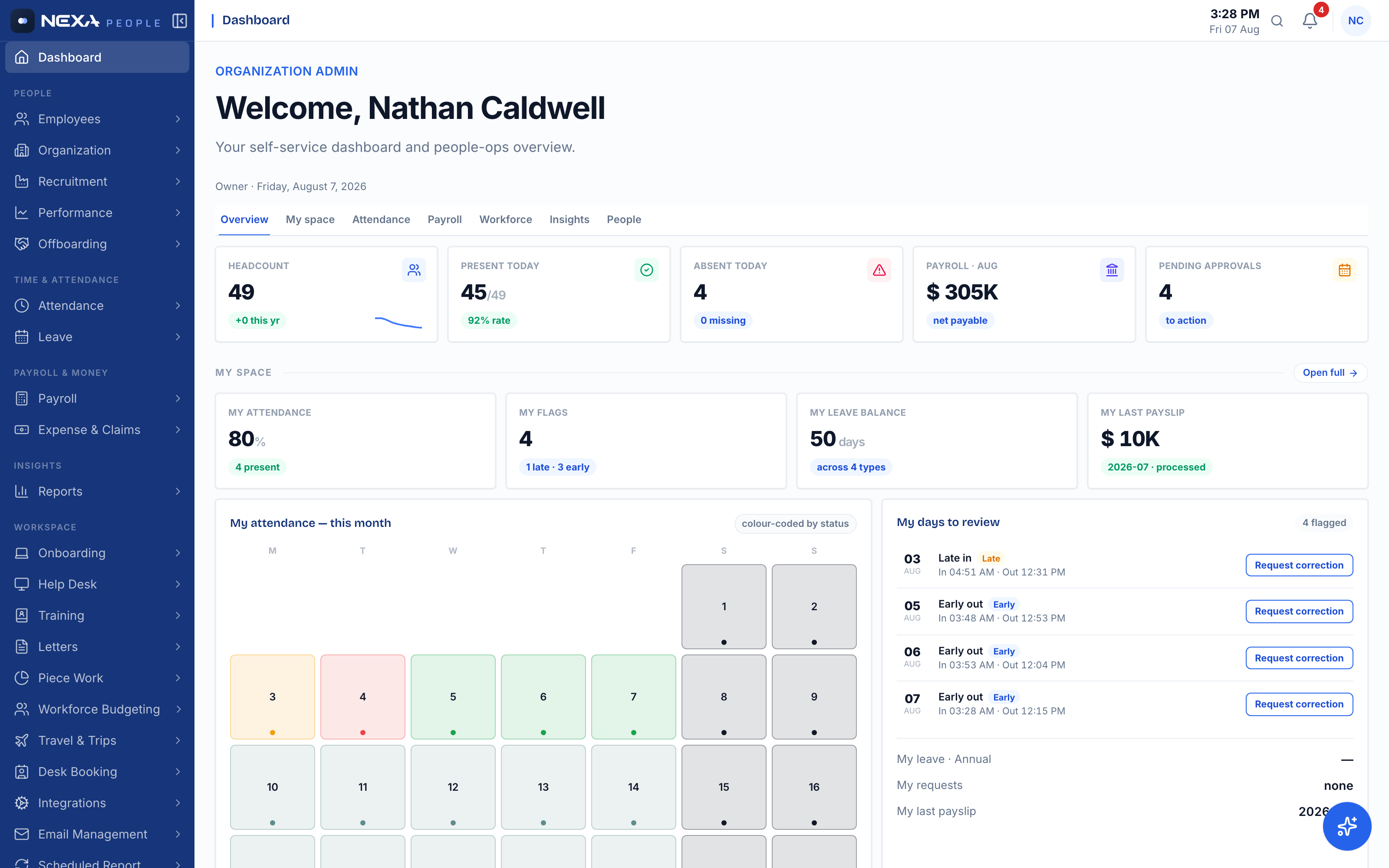
Headcount, who is in today, payroll due this month, and the approvals waiting on you — then your own attendance, leave balance, and payslip on the same page. One scroll covers what used to take five systems and three follow-up emails.
- Live present/absent counts from real punches
- Pending approvals surfaced, not buried in email
- Every number clicks through to the full module
Payroll
Payroll that computes itself — taxes, deductions, and all
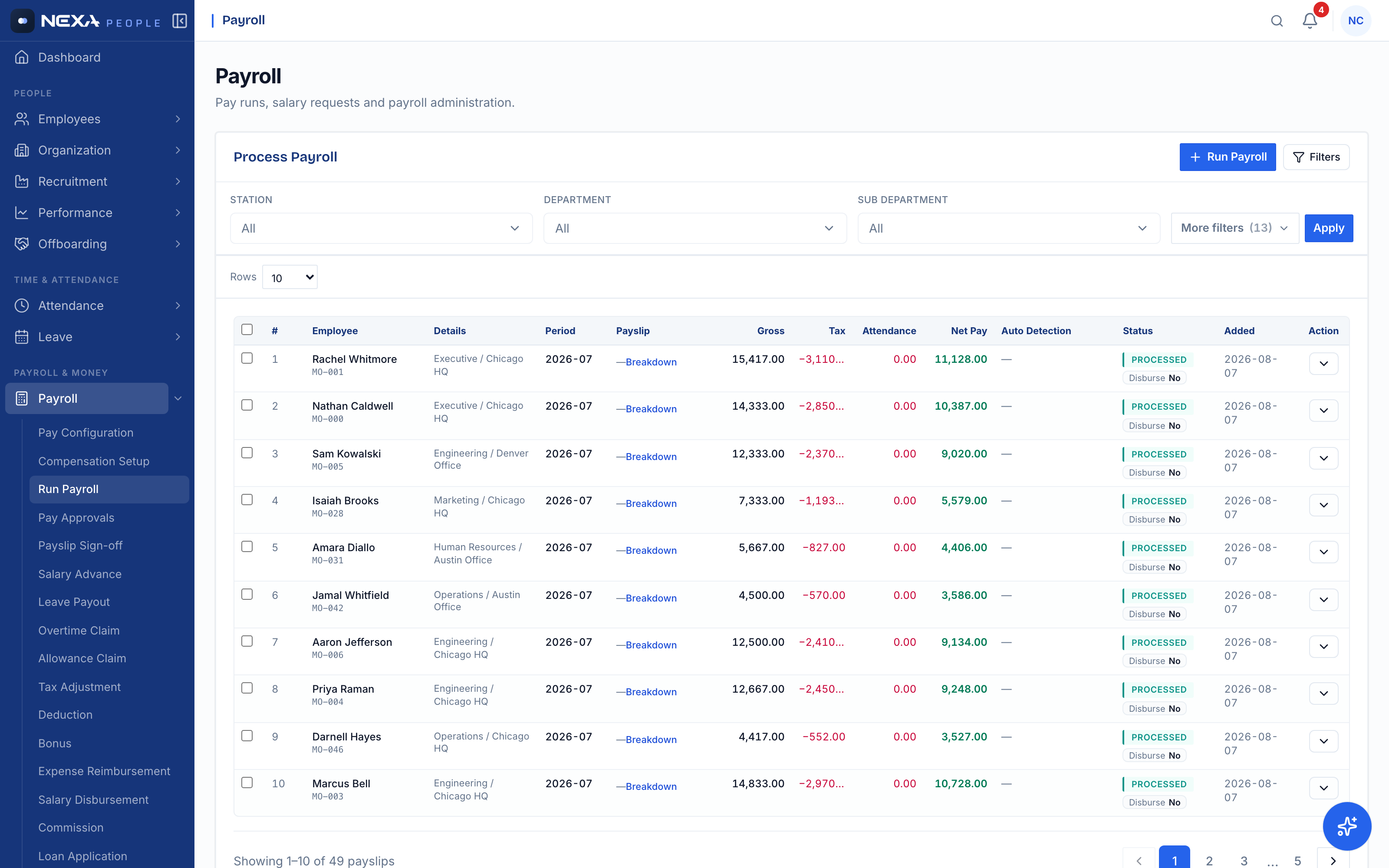
Salary structures feed pay runs; attendance feeds deductions; tax slabs apply themselves. Every payslip shows gross, tax, and net with a full breakdown — processed for the whole company in one run, not one spreadsheet per department.
- Per-employee salary setups with allowance lines
- Tax and FICA-style deductions computed per slab
- Approval and sign-off workflow before disbursement
Attendance
Biometric punches become clean records — automatically
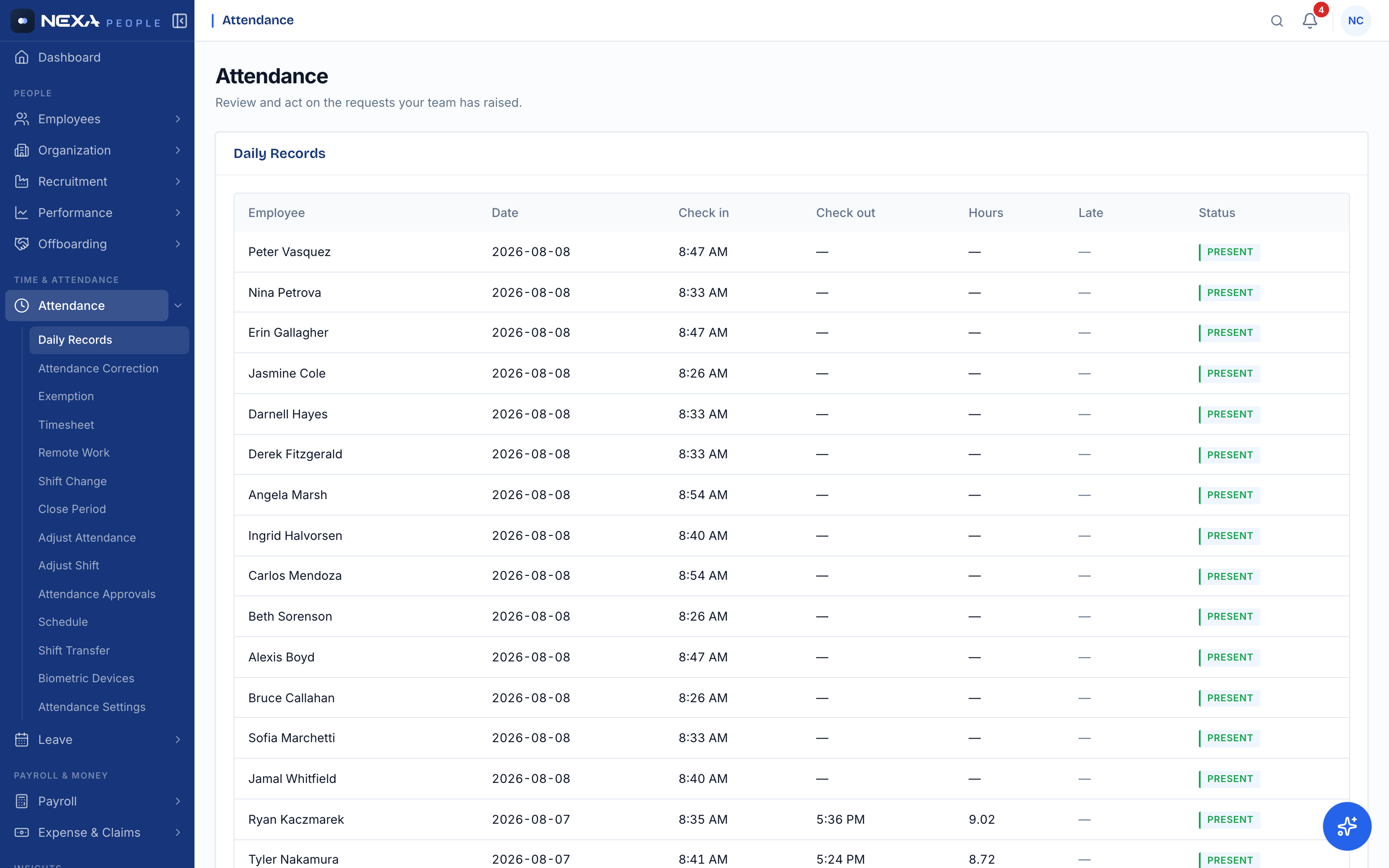
Devices push punches straight into daily records: check-in, check-out, hours, late flags, on-leave and absent statuses. No collection, no reconciliation, no "whose timesheet is missing" — the data arrives already structured.
- Biometric device sync — no manual entry
- Late / absent / on-leave flagged as it happens
- Corrections, exemptions and approvals built in
Workforce Analytics
Answers your board asks for, without a data pull
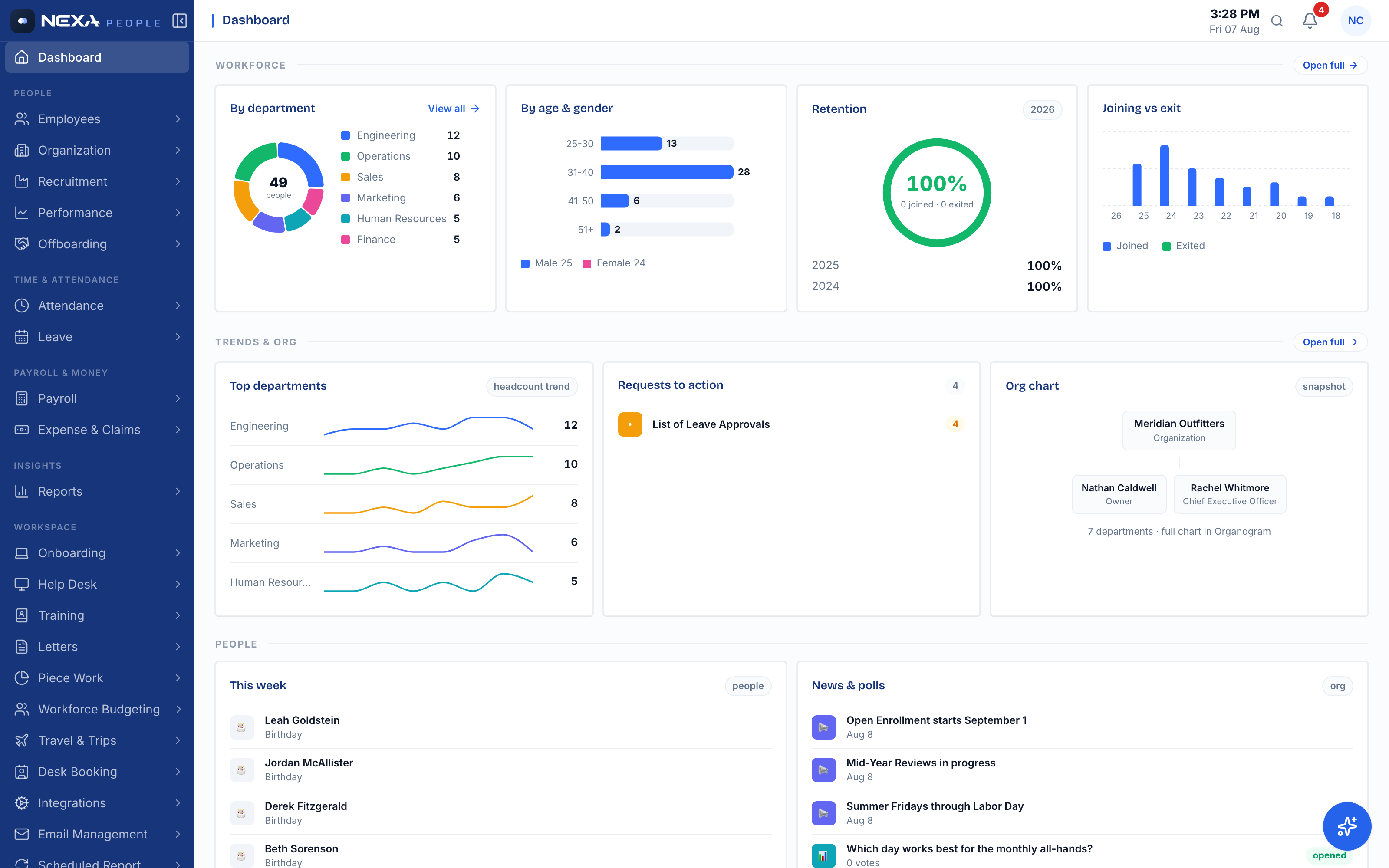
Headcount by department, age and gender mix, retention year over year, joiners versus exits, and the org chart — computed live from the same records that run payroll. When the numbers come from the system of record, nobody argues with the deck.
- Department, age, gender and retention breakdowns
- Joining-vs-exit trend across the year
- Org chart generated from reporting lines
Leave
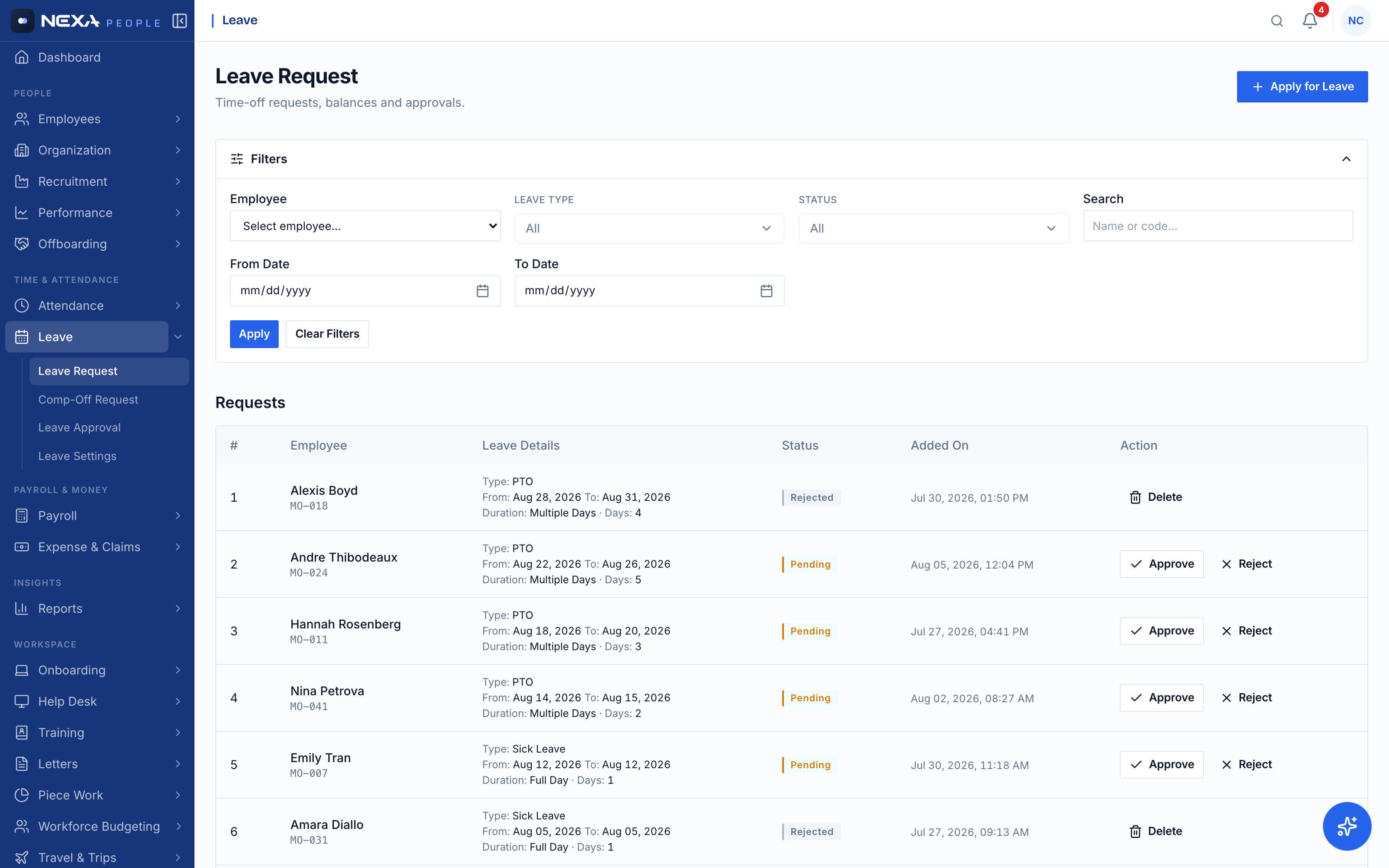
Leave requests that route themselves to the right manager
PTO, sick, parental, bereavement — each type with its own entitlement, balances that recalculate on approval, and a queue managers actually clear. Employees see their balance before they ask; HR stops being the middleman.
- Per-type entitlements and live balances
- Approve / reject with one click from the queue
- Half-day, multi-day, and compensatory flows
Reports
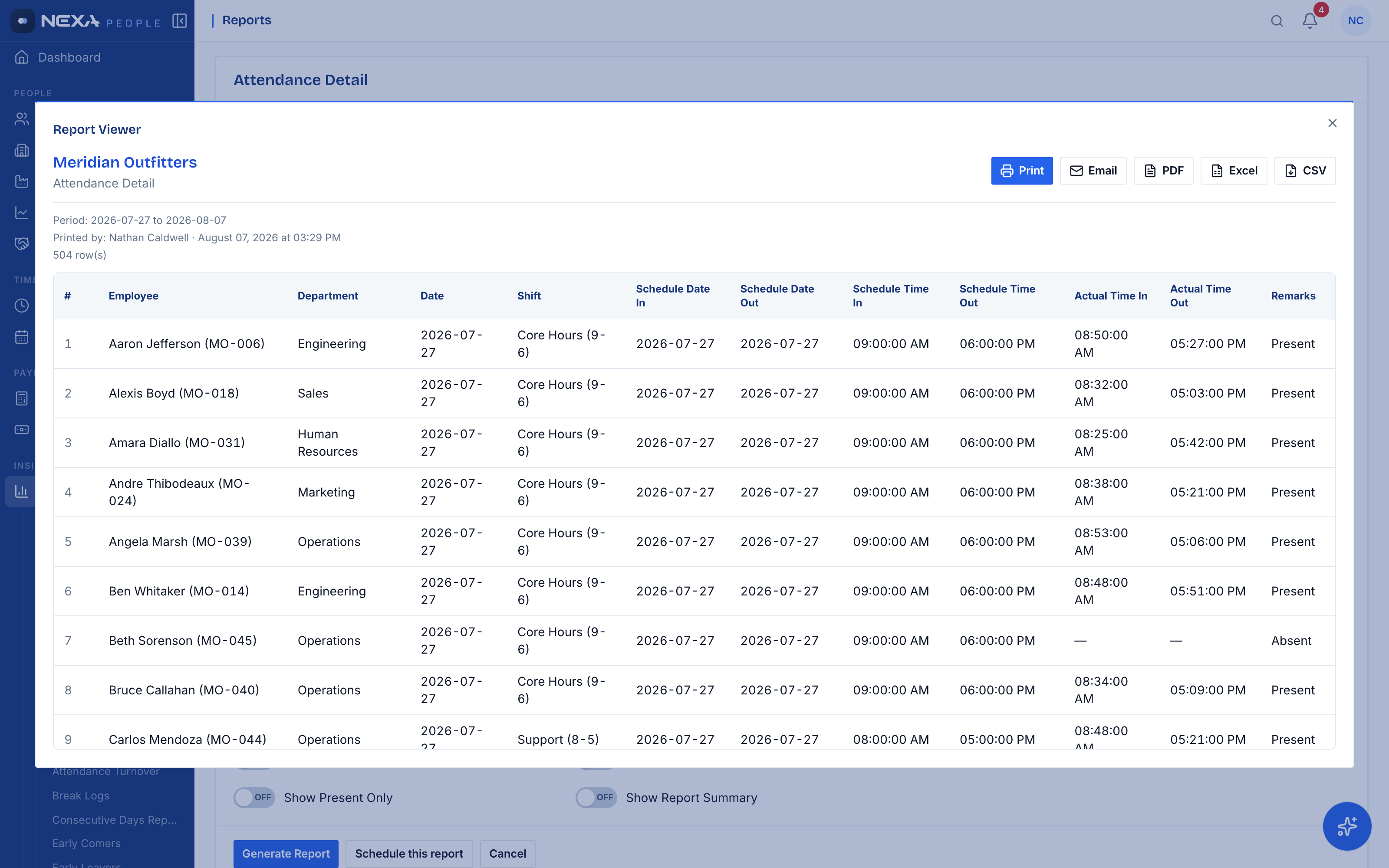
Auditable reports in four clicks, exported in five
Attendance detail, payroll registers, absentee lists, turnover — filtered by station, department, group, or shift, grouped how your auditor wants it, exported to PDF, Excel, or CSV. The month-end binder builds itself.
- Dozens of pre-built people/attendance/payroll reports
- Print, email, PDF, Excel, CSV from one viewer
- Schedule recurring reports to your inbox
The math
Count what manual HR admin actually costs.
Take one payroll cycle: collect timesheets, reconcile attendance, apply leave, compute deductions, fix disputes. At a conservative 15 minutes per employee per month, the arithmetic is not on your side.
Spreadsheet HR
125 hrs/mo
of admin for a 500-person company at 15 min per employee — before a single error, dispute, or audit request lands on top.
- · Attendance: collected and reconciled by hand
- · Payroll: recomputed after every correction
- · Audit trail: scattered across files and inboxes
Nexa People
One run
Punches arrive from devices, leave applies itself to attendance, payroll computes from rules — HR reviews and approves instead of retyping.
- · Attendance: streams in from biometric devices
- · Payroll: computed, reviewed, approved, done
- · Audit trail: every action logged with who and when
Bring your org chart — we'll set it up live on the call.
Questions HR teams ask before the demo
Does it work with our biometric attendance devices?
Yes — devices push punches directly to Nexa People over the standard ADMS protocol. Punches land as attendance records in real time, matched to employees by their device ID.
Can it handle our payroll rules?
Salary structures, allowance lines, tax slabs, and deduction rules are configured per organization. Pay runs compute from your rules and your attendance data, with an approval step before anything is disbursed.
What do employees see?
A self-service portal scoped to them: their attendance calendar, leave balances and requests, payslips, and HR requests — without seeing anyone else's data.
How long does implementation take?
Org structure, shifts and leave types are configured in days. Employee data imports from Excel. Most teams run their first parallel payroll within the first month.
Your next payroll run is coming.
Decide what it costs you.
Every month on spreadsheets is another month of payroll history you can't audit. See your own org structure running in Nexa People on the demo call.
Prefer email first?